Compare: Difference between revisions
Jump to navigation
Jump to search
No edit summary |
No edit summary |
||
| (21 intermediate revisions by the same user not shown) | |||
| Line 1: | Line 1: | ||
{|border="1" | {|border="1" | ||
| | | https://karaoke.kjams.com/screenshots/cdg_bad.gif | ||
| | | https://karaoke.kjams.com/screenshots/cdg_good.gif | ||
|- | |- | ||
| align="center" | iStar with a scratchy disc | | align="center" | '''iStar''' with a scratchy disc | ||
| align="center" | kJams with the same disc | | align="center" | '''kJams''' with the same disc | ||
|} | |} | ||
{|border="1" | {|border="1" | ||
| Feature | | '''Feature''' | ||
| iStar 1.5.3 | | '''iStar 1.5.3''' | ||
| kJams Lite | | '''kJams Lite''' | ||
|- | |- | ||
| Price | | Price | ||
| align="center" | $50 | | align="center" | $50 | ||
| align="center" | $40 | | align="center" | $40 | ||
|- | |- | ||
| Keep music folder organized | | Keep music folder organized | ||
| Line 37: | Line 33: | ||
| | | | ||
|- | |- | ||
| | | Plays KAR files | ||
| align="center" | ✓ | | align="center" | ✓ | ||
| | |||
|- | |||
| Play LRC files | |||
| align="center" | ✓ | | align="center" | ✓ | ||
| align="center" | ✓ | |||
|- | |- | ||
| Rip CDG tracks or discs | | Play AIFF, MP3 + CDG files | ||
| align="center" | ✓ | |||
| align="center" | ✓ | |||
|- | |||
| Rip CDG tracks or discs (MP3+CDG) | |||
| align="center" | ✓ | | align="center" | ✓ | ||
| align="center" | ✓ | | align="center" | ✓ | ||
| Line 57: | Line 61: | ||
| align="center" | ✓ | | align="center" | ✓ | ||
|- | |- | ||
| Edit meta info | | Edit song meta info (within database) | ||
| align="center" | ✓ | | align="center" | ✓ | ||
| align="center" | ✓ | | align="center" | ✓ | ||
| Line 63: | Line 67: | ||
| freedb "get" (load info from freedb) | | freedb "get" (load info from freedb) | ||
| align="center" | ✓ | | align="center" | ✓ | ||
| align="center" | ✓ | |||
|- | |||
| Play Enhanced LRC and UltraStar (SingStar) files | |||
| | |||
| align="center" | ✓ | |||
|- | |||
| Play [http://www.griffintechnology.com/products/tuneprompter TunePrompter] files | |||
| | |||
| align="center" | ✓ | |||
|- | |||
| Rip / Play SuperCDG and NEO+G discs | |||
| | |||
| align="center" | ✓ | |||
|- | |||
| Play MCG, NCG, KMA files? | |||
| | |||
| align="center" | ✓ | |||
|- | |||
| Play any QuickTime file type | |||
| | |||
| align="center" | ✓ | |||
|- | |||
| Option for [[Burning]] new mix CD+G discs | |||
| | |||
| align="center" | ✓ | |||
|- | |||
| Option for [[Producer|Producing]] your own CDG songs | |||
| | |||
| align="center" | ✓ | | align="center" | ✓ | ||
|- | |- | ||
| Line 70: | Line 102: | ||
|- | |- | ||
| Glitch Free Graphics (see graphics above) | | Glitch Free Graphics (see graphics above) | ||
| | |||
| align="center" | ✓ | |||
|- | |||
| Suppress vocals from one channel | |||
| | | | ||
| align="center" | ✓ | | align="center" | ✓ | ||
|- | |- | ||
| Play direct from disc | | Play direct from disc | ||
| | |||
| align="center" | ✓ | |||
|- | |||
| Encode (rip) to AAC, WAV, AIFF, AppleLossless, OggVorbis | |||
| | |||
| align="center" | ✓ | |||
|- | |||
| Export QuickTime, Export for Video iPod | |||
| | |||
| align="center" | ✓ | |||
|- | |||
| Edit Unicode Metadata Tags (ID3, Vorbis, QuickTime, [[Xattr]]) | |||
| | | | ||
| align="center" | ✓ | | align="center" | ✓ | ||
| Line 81: | Line 129: | ||
| align="center" | ✓ | | align="center" | ✓ | ||
|- | |- | ||
| | | Set the Lyrics screen to arbitrary size, or full screen | ||
| | | | ||
| align="center" | ✓ | | align="center" | ✓ | ||
|- | |- | ||
| | | Remote Control (via AppleRemote, or BlueTooth) | ||
| | | | ||
| align="center" | ✓ | | align="center" | ✓ | ||
|- | |- | ||
| | | Rip CDG & Encode tracks or discs in the background | ||
| | | | ||
| align="center" | ✓ | | align="center" | ✓ | ||
|- | |- | ||
| | | Import folders of songs, thousands at a time, easily | ||
| | | | ||
| align="center" | ✓ | | align="center" | ✓ | ||
|- | |- | ||
| Import | | Import and play zipped files directly | ||
| | | | ||
| align="center" | ✓ | | align="center" | ✓ | ||
|- | |- | ||
| | | While ripping, automatically Zip the resulting files | ||
| | | | ||
| align="center" | ✓ | | align="center" | ✓ | ||
| Line 109: | Line 157: | ||
| align="center" | ✓ | | align="center" | ✓ | ||
|- | |- | ||
| Preset Playlists | | [[Target Mode]] for easy playlist creation | ||
| | |||
| align="center" | ✓ | |||
|- | |||
| [[Preset Playlists]] | |||
| | | | ||
| align="center" | ✓ | | align="center" | ✓ | ||
| Line 117: | Line 169: | ||
| align="center" | ✓ | | align="center" | ✓ | ||
|- | |- | ||
| | | Plug in a microphone to sing along | ||
| | | | ||
| align="center" | ✓ | | align="center" | ✓ | ||
|- | |- | ||
| Export | | Export XML | ||
| | | | ||
| align="center" | ✓ | | align="center" | ✓ | ||
| Line 129: | Line 181: | ||
| align="center" | ✓ | | align="center" | ✓ | ||
|- | |- | ||
| Switchable Albums | | [[Switchable Albums]] | ||
| | | | ||
| align="center" | ✓ | | align="center" | ✓ | ||
| Line 157: | Line 209: | ||
| align="center" | ✓ | | align="center" | ✓ | ||
|- | |- | ||
| Call the author's cell phone for tech support | | Call the author's cell phone for tech support | ||
| | | | ||
| align="center" | ✓ | | align="center" | ✓ | ||
Latest revision as of 00:59, 2 February 2012
|
|
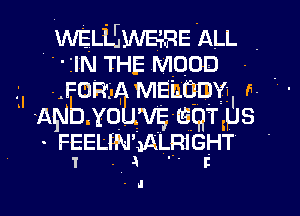
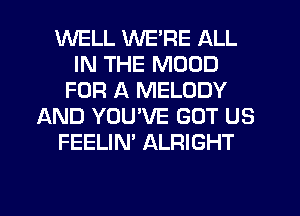
| iStar with a scratchy disc | kJams with the same disc |
| Feature | iStar 1.5.3 | kJams Lite |
| Price | $50 | $40 |
| Keep music folder organized | ✓ | |
| browse and use iTunes library | ✓ | |
| Smart Playlists | ✓ | |
| Super Slick web site with flash graphics | ✓ | |
| Plays KAR files | ✓ | |
| Play LRC files | ✓ | ✓ |
| Play AIFF, MP3 + CDG files | ✓ | ✓ |
| Rip CDG tracks or discs (MP3+CDG) | ✓ | ✓ |
| Playlists | ✓ | ✓ |
| Size the Lyrics screen to different 3 preset sizes | ✓ | ✓ |
| Import existing songs one at a time | ✓ | ✓ |
| Edit song meta info (within database) | ✓ | ✓ |
| freedb "get" (load info from freedb) | ✓ | ✓ |
| Play Enhanced LRC and UltraStar (SingStar) files | ✓ | |
| Play TunePrompter files | ✓ | |
| Rip / Play SuperCDG and NEO+G discs | ✓ | |
| Play MCG, NCG, KMA files? | ✓ | |
| Play any QuickTime file type | ✓ | |
| Option for Burning new mix CD+G discs | ✓ | |
| Option for Producing your own CDG songs | ✓ | |
| Change pitch and tempo independently on all audio types | ✓ | |
| Glitch Free Graphics (see graphics above) | ✓ | |
| Suppress vocals from one channel | ✓ | |
| Play direct from disc | ✓ | |
| Encode (rip) to AAC, WAV, AIFF, AppleLossless, OggVorbis | ✓ | |
| Export QuickTime, Export for Video iPod | ✓ | |
| Edit Unicode Metadata Tags (ID3, Vorbis, QuickTime, Xattr) | ✓ | |
| Make the Lyrics show in a separate window | ✓ | |
| Set the Lyrics screen to arbitrary size, or full screen | ✓ | |
| Remote Control (via AppleRemote, or BlueTooth) | ✓ | |
| Rip CDG & Encode tracks or discs in the background | ✓ | |
| Import folders of songs, thousands at a time, easily | ✓ | |
| Import and play zipped files directly | ✓ | |
| While ripping, automatically Zip the resulting files | ✓ | |
| full freedb support, including local database and submit | ✓ | |
| Target Mode for easy playlist creation | ✓ | |
| Preset Playlists | ✓ | |
| Pause between tracks | ✓ | |
| Plug in a microphone to sing along | ✓ | |
| Export XML | ✓ | |
| Export actual song files | ✓ | |
| Switchable Albums | ✓ | |
| Copy and Paste to print song books | ✓ | |
| deep web site with lots and lots of info | ✓ | |
| weekly updates and bug fixes | ✓ | |
| almost all code changes are documented publicly, as they happen | ✓ | |
| author actually answers all questions posted to forums | ✓ | |
| insanely dedicated, nearly instantaneous email tech support | ✓ | |
| Call the author's cell phone for tech support | ✓ |
Did I miss anything? Did I get anything wrong? If I screwed up something (entirely possible), please let me know so I can correct it, I do NOT want anything misrepresented.